728x90
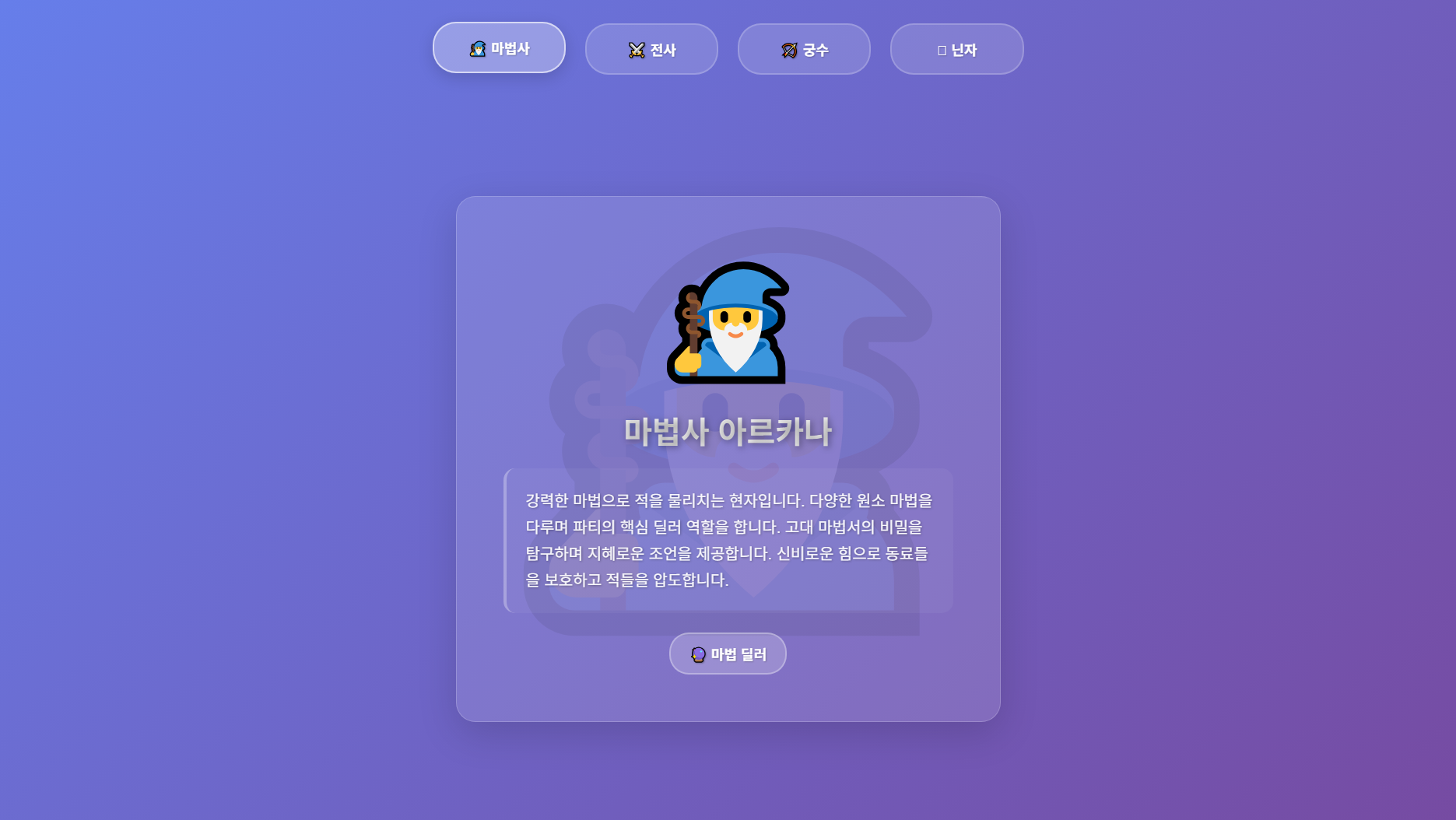
버튼을 누르면 배경색과 캐릭터 정보가 동시에 부드럽게 변하는 인터랙티브한 웹페이지를 만들어보겠습니다. 하나의 버튼 클릭으로 전체 페이지가 완전히 다른 느낌으로 변하는 효과를 구현해보겠습니다.
1. 버튼 클릭 이벤트와 데이터 연동
핵심은 각 캐릭터마다 배경색과 내용을 미리 정의해두고, 버튼 클릭 시 모든 요소를 동시에 변경하는 것입니다.
// 캐릭터별 데이터 정의
const characters = {
wizard: {
emoji: '🧙♂️',
background: 'linear-gradient(135deg, #667eea, #764ba2)' // 보라색 마법사 테마
},
warrior: {
emoji: '⚔️',
background: 'linear-gradient(135deg, #ff6b6b, #ee5a52)' // 빨간색 전사 테마
},
archer: {
emoji: '🏹',
background: 'linear-gradient(135deg, #11998e, #38ef7d)' // 초록색 궁수 테마
},
ninja: {
emoji: '🥷',
background: 'linear-gradient(135deg, #434343, #000000)' // 검은색 닌자 테마
}
};
// 버튼 클릭 시 실행되는 함수
function handleCharacterChange(button) {
const characterKey = button.getAttribute('data-character');
const character = characters[characterKey];
// 1. 배경 변경
document.body.style.background = character.background;
// 2. 배경 캐릭터 변경
backgroundCharacter.textContent = character.emoji;
// 3. 카드 내용 변경
showCharacterCard(characterKey);
}
핵심 포인트:
- 각 캐릭터마다 고유한 background 색상 정의
- data-character 속성으로 버튼과 데이터 연결
- 클릭 한 번으로 배경, 아이콘, 내용이 모두 변경
2. 부드러운 배경 전환 효과
배경이 갑자기 바뀌지 않고 자연스럽게 변하도록 CSS 트랜지션을 적용합니다.
body {
    background: linear-gradient(135deg, #667eea, #764ba2);
    transition: all 0.8s cubic-bezier(0.4, 0, 0.2, 1); /* 부드러운 배경 전환 */
}

.background-character {
    position: fixed;
    font-size: clamp(200px, 25vw, 500px);
    opacity: 0.08;
    transition: all 0.8s cubic-bezier(0.4, 0, 0.2, 1); /* 배경 캐릭터도 부드럽게 */
    animation: float 6s ease-in-out infinite;
}

@keyframes float {
    0%, 100% { transform: translate(-50%, -50%) translateY(0px); }
    50% { transform: translate(-50%, -50%) translateY(-10px); }
}
시각적 효과:
- transition: all 0.8s: 0.8초에 걸쳐 부드럽게 변경
- cubic-bezier: 자연스러운 가속도 곡선
- float 애니메이션: 배경 캐릭터가 둥둥 떠다니는 효과
3. 카드 콘텐츠 전환 애니메이션
버튼을 누르면 이전 카드는 사라지고 새로운 카드가 나타나는 효과를 구현합니다.
function showCharacterCard(characterKey) {
    // 1. 모든 카드 숨기기
    cards.forEach(card => card.classList.remove('active'));

    // 2. 선택된 카드 보이기 (약간의 딜레이로 부드러운 전환)
    const selectedCard = document.getElementById(characterKey + '-card');
    setTimeout(() => {
        selectedCard.classList.add('active');
    }, 200); // 200ms 딜레이로 더 자연스러운 전환
}
.character-card {
    display: none;
    opacity: 0;
    transform: translateY(30px) scale(0.95); /* 아래에서 위로, 작게 시작 */
    transition: all 0.8s cubic-bezier(0.4, 0, 0.2, 1);
}

.character-card.active {
    display: block;
    opacity: 1;
    transform: translateY(0) scale(1); /* 원래 위치와 크기로 */
}
전환 단계:
- 이전 카드가 active 클래스 제거되며 사라짐
- 200ms 후 새 카드에 active 클래스 추가
- 새 카드가 아래에서 위로 부드럽게 나타남
4. 완전한 인터랙티브 경험 구현
모든 요소가 조화롭게 변하도록 이벤트를 통합 관리합니다.
// 모든 버튼에 이벤트 리스너 추가
buttons.forEach(button => {
    button.addEventListener('click', () => {
        // 1. 활성 버튼 시각적 변경
        buttons.forEach(btn => btn.classList.remove('active'));
        button.classList.add('active');

        // 2. 전체 테마 변경 실행
        handleCharacterChange(button);
    });
});

// 키보드 지원 (선택사항)
document.addEventListener('keydown', (e) => {
    const activeButton = document.querySelector('.character-btn.active');
    const currentIndex = Array.from(buttons).indexOf(activeButton);

    if (e.key === 'ArrowLeft' || e.key === 'ArrowRight') {
        const nextIndex = e.key === 'ArrowLeft'
            ? (currentIndex > 0 ? currentIndex - 1 : buttons.length - 1)
            : (currentIndex < buttons.length - 1 ? currentIndex + 1 : 0);

        buttons[nextIndex].click(); // 버튼 클릭과 동일한 효과
    }
});
HTML 구조:
<!-- 버튼들 -->
<button class="character-btn active" data-character="wizard">🧙♂️ 마법사</button>
<button class="character-btn" data-character="warrior">⚔️ 전사</button>
<!-- 각 캐릭터별 카드 -->
<div class="character-card active" id="wizard-card">
<div class="character-image">🧙♂️</div>
<div class="character-name">마법사 아르카나</div>
<div class="character-description">강력한 마법으로...</div>
</div>
동작 원리:
- 버튼의 data-character="wizard" 속성 읽기
- characters.wizard 데이터 가져오기
- 배경색 → 배경 캐릭터 → 카드 내용 순차적 변경
- 모든 변경사항이 부드러운 애니메이션과 함께 실행
💡 따라하기 팁
1단계: 데이터 구조 설정
const characters = {
    your_theme: {
        emoji: '🎨',
        background: 'linear-gradient(135deg, #색상1, #색상2)'
    }
};
2단계: HTML에 data 속성 추가
<button data-character="your_theme">🎨 테마명</button>
<div id="your_theme-card">내용...</div>
3단계: CSS 트랜지션 적용
body { transition: all 0.8s ease; }
이 방식으로 버튼 하나로 전체 페이지의 분위기를 완전히 바꾸는 인상적인 인터랙션을 만들 수 있습니다!
배경을 이미지 파일로 적용 버전
javascript
const characters = {
    wizard: {
        emoji: 'url("images/wizard-castle.jpg")',
        background: 'url("images/wizard-bg.jpg") center/cover'
    },
    warrior: {
        emoji: 'url("images/wizard-castle.jpg")',
        background: 'url("images/warrior-bg.jpg") center/cover'
    },
    archer: {
        emoji: 'url("images/wizard-castle.jpg")',
        background: 'url("images/archer-bg.jpg") center/cover'
    },
    ninja: {
        emoji: 'url("images/wizard-castle.jpg")',
        background: 'url("images/ninja-bg.jpg") center/cover'
    }
};
📁 완성된 예시 파일
위에서 설명한 모든 기능이 포함된 완전한 HTML 파일을 확인하고 싶으시면, 밑에 파일을 다운로드해서 확인해주세요~
728x90
'웹 퍼블리싱 | Web Publishing > 스크립트 | Script' 카테고리의 다른 글
| 마우스 커서 이미지 교체로 파리잡기 게임 만들기 (1) | 2025.06.26 |
|---|---|
| 시간에 따라 자동으로 테마가 바뀌는 웹페이지 만들기 (1) | 2025.06.24 |
| 모바일 웹에서 가로형 화면 사용을 제한하는 방법 (0) | 2025.06.24 |


