728x90
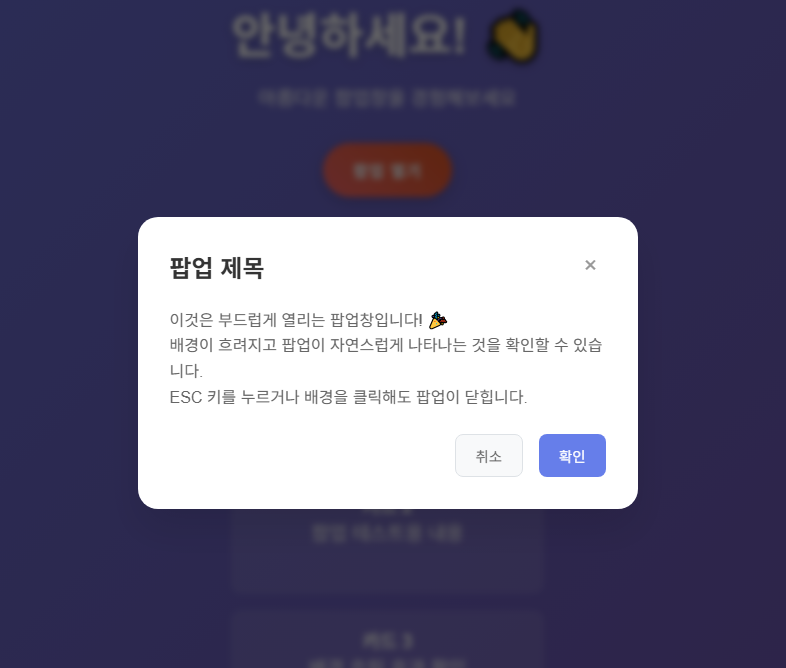
웹사이트를 만들다 보면 팝업창이 필요한 순간이 많습니다. 하지만 갑자기 나타나는 딱딱한 팝업은 사용자 경험을 해칠 수 있어요. 오늘은 부드럽게 열리고 배경이 흐려지는 세련된 팝업창을 만드는 방법을 알려드릴게요!
🎯 완성된 모습 미리보기
우리가 만들 팝업창의 특징:
- 부드러운 스케일 애니메이션으로 나타남
- 배경 콘텐츠가 자연스럽게 흐려짐
- ESC 키, 배경 클릭으로 닫기 가능
- 모바일에서도 완벽하게 작동
- 현대적이고 세련된 디자인
📋 기본 HTML 구조 만들기
먼저 팝업창의 기본 골격을 만들어보겠습니다.
<!DOCTYPE html>
<html lang="ko">
<head>
<meta charset="UTF-8">
<meta name="viewport" content="width=device-width, initial-scale=1.0">
<title>부드러운 팝업창</title>
</head>
<body>
<!-- 메인 콘텐츠 영역 -->
<div class="main-content" id="mainContent">
<h1>안녕하세요! 👋</h1>
<p>아름다운 팝업창을 경험해보세요</p>
<button class="open-popup-btn" onclick="openPopup()">팝업 열기</button>
</div>
<!-- 팝업 오버레이 -->
<div class="popup-overlay" id="popupOverlay" onclick="closePopup(event)">
<div class="popup-content" onclick="event.stopPropagation()">
<div class="popup-header">
<h2 class="popup-title">팝업 제목</h2>
<button class="close-btn" onclick="closePopup()">×</button>
</div>
<div class="popup-body">
<p>이것은 부드럽게 열리는 팝업창입니다! 🎉</p>
</div>
<div class="popup-footer">
<button class="btn btn-secondary" onclick="closePopup()">취소</button>
<button class="btn btn-primary" onclick="handleConfirm()">확인</button>
</div>
</div>
</div>
</body>
</html>
구조 설명:
- main-content: 메인 페이지 내용
- popup-overlay: 팝업 배경 (어두운 오버레이)
- popup-content: 실제 팝업 내용
🎨 CSS 스타일링 - 마법이 시작되는 곳
1. 기본 스타일과 메인 콘텐츠
* {
    margin: 0;
    padding: 0;
    box-sizing: border-box;
}

body {
    font-family: 'Arial', sans-serif;
    background: linear-gradient(135deg, #667eea 0%, #764ba2 100%);
    min-height: 100vh;
    display: flex;
    align-items: center;
    justify-content: center;
    transition: filter 0.3s ease; /* 흐림 효과를 위한 전환 */
}

.open-popup-btn {
    background: linear-gradient(45deg, #ff6b6b, #ee5a24);
    border: none;
    color: white;
    padding: 15px 30px;
    font-size: 1rem;
    border-radius: 50px;
    cursor: pointer;
    transition: all 0.3s ease;
}

.open-popup-btn:hover {
    transform: translateY(-2px);
    box-shadow: 0 6px 20px rgba(0,0,0,0.3);
}
포인트:
- transition: filter 0.3s ease로 흐림 효과가 부드럽게 적용됩니다
- 그라데이션 배경으로 시각적 매력도 높입니다
2. 팝업 오버레이 - 핵심 애니메이션
.popup-overlay {
    position: fixed;
    top: 0;
    left: 0;
    width: 100%;
    height: 100%;
    background: rgba(0, 0, 0, 0.6);
    display: flex;
    align-items: center;
    justify-content: center;
    z-index: 1000;

    /* 초기 상태: 보이지 않음 */
    visibility: hidden;
    opacity: 0;
    transition: all 0.3s ease;
    backdrop-filter: blur(5px); /* 배경 블러 효과 */
}

.popup-overlay.active {
    visibility: visible;
    opacity: 1;
}
핵심 기술:
- visibility: hidden과 opacity: 0으로 초기에 숨김
- .active 클래스로 표시 상태 제어
- backdrop-filter: blur(5px)로 배경 블러 효과
3. 팝업 콘텐츠 - 부드러운 등장 효과
.popup-content {
    background: white;
    padding: 2rem;
    border-radius: 20px;
    max-width: 500px;
    width: 90%;
    position: relative;

    /* 초기 상태: 작고 위쪽에 위치 */
    transform: scale(0.7) translateY(-50px);
    transition: all 0.3s cubic-bezier(0.34, 1.56, 0.64, 1);
    box-shadow: 0 20px 40px rgba(0,0,0,0.1);
}

.popup-overlay.active .popup-content {
    transform: scale(1) translateY(0); /* 정상 크기와 위치로 */
}
애니메이션 비밀:
- cubic-bezier(0.34, 1.56, 0.64, 1): 탄성 있는 애니메이션 효과
- scale(0.7)에서 scale(1)로: 크기 변화
- translateY(-50px)에서 translateY(0)으로: 위치 변화
4. 배경 흐림 효과
.blur {
    filter: blur(3px);
}
간단하지만 강력한 효과입니다!
⚡ JavaScript 기능 구현
1. 팝업 열기 함수
function openPopup() {
    const overlay = document.getElementById('popupOverlay');
    const mainContent = document.getElementById('mainContent');

    overlay.classList.add('active');
    mainContent.classList.add('blur');
    document.body.style.overflow = 'hidden'; // 스크롤 방지
}
2. 팝업 닫기 함수 (여러 방법 지원)
function closePopup(event) {
    // 팝업 내용 클릭 시 닫히지 않도록 방지
    if (event && event.target.closest('.popup-content') &&
        event.target !== document.getElementById('popupOverlay')) {
        return;
    }

    const overlay = document.getElementById('popupOverlay');
    const mainContent = document.getElementById('mainContent');

    overlay.classList.remove('active');
    mainContent.classList.remove('blur');
    document.body.style.overflow = 'auto'; // 스크롤 복원
}

// ESC 키로 팝업 닫기
document.addEventListener('keydown', function(event) {
    if (event.key === 'Escape') {
        closePopup();
    }
});
편의 기능:
- 배경 클릭으로 닫기
- ESC 키로 닫기
- X 버튼으로 닫기
- 팝업 내용 클릭 시에는 닫히지 않음
🔧 추가 개선 아이디어
1. 다양한 애니메이션 효과
/* 페이드 인 효과 */
.fade-in {
    transform: translateY(0);
    opacity: 0;
}

.popup-overlay.active .fade-in {
    opacity: 1;
    transition: opacity 0.4s ease;
}

/* 회전 효과 */
.rotate-in {
    transform: scale(0.7) rotate(-10deg);
}

.popup-overlay.active .rotate-in {
    transform: scale(1) rotate(0deg);
}
2. 모바일 최적화
@media (max-width: 768px) {
    .popup-content {
        width: 95%;
        margin: 1rem;
        border-radius: 15px;
    }

    .popup-body {
        font-size: 0.9rem;
    }
}
🎯 완성된 코드 활용 팁
- 색상 커스터마이징: CSS 변수를 사용하면 쉽게 테마를 변경할 수 있습니다
- 다중 팝업: ID 대신 클래스를 사용하면 여러 팝업을 관리할 수 있습니다
- 접근성 개선: aria-hidden 속성을 추가하여 스크린 리더 지원을 향상시킬 수 있습니다
🚀 마무리
이제 여러분도 프로페셔널한 팝업창을 만들 수 있습니다! 핵심은:
- CSS transition으로 부드러운 애니메이션
- transform으로 크기와 위치 변화
- backdrop-filter로 배경 블러 효과
- JavaScript로 사용자 친화적인 인터랙션
작은 디테일이 사용자 경험을 크게 바꿀 수 있어요. 여러분의 웹사이트에도 이런 세련된 팝업을 적용해보세요!
💡 다음 포스팅 예고: 드래그 앤 드롭이 가능한 모달창 만들기를 다뤄보겠습니다. 기대해주세요!
📁 완성된 예시 파일
위에서 설명한 모든 기능이 포함된 완전한 HTML 파일을 확인하고 싶으시면, 밑에 파일을 다운로드해서 확인해주세요~
728x90
'웹 퍼블리싱 | Web Publishing > 팝업 | Popup' 카테고리의 다른 글
| 순수 JavaScript로 드래그 가능한 모달창 만들기 (3) | 2025.06.27 |
|---|
